
Troubleshooting
Data cannot be entered into a userform in Excel
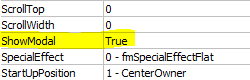
Allow WinWedge data macros to run by making your Excel UserForm nonmodal.
This issue is caused by the default “ShowModal” UserForm property. This value is sometimes set to “True”, which means that no other code outside the form can run until the Modal form is unloaded. To change this, set the “ShowModal” property to “False”. This should allow any code to run, specifically the code to capture the data from WinWedge.
Last modified on November 3, 2026